API vs open source · invoice OCR · updated March 2026
GPT-4o vs PaddleOCR.
GPT-5.4 costs money but thinks. PaddleOCR is free but extracts. I tested both to find out when the thinking is worth paying for. Same invoice. Different approaches.
§ 01 · Side-by-side
The numbers, row by row.
| Metric | PaddleOCR | GPT-5.4 |
|---|---|---|
| Time | 4.85s | 7.58s |
| Confidence | 99.6% | N/A |
| Character errors | 0 | 0 |
| Table structure | Lost | Preserved |
| Cost per image | $0 | ~$0.01 |
| Tokens used | N/A | 943 |
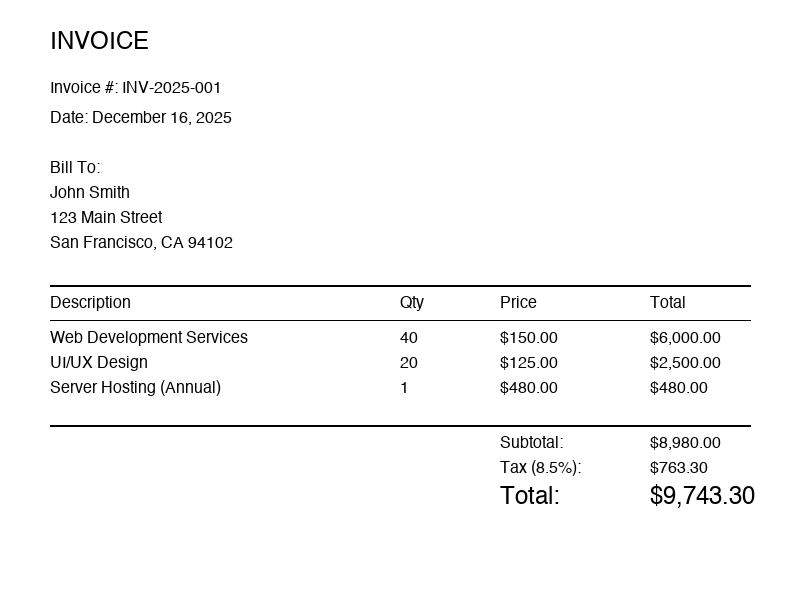
Test invoice. 800x600 pixels, white background, standard fonts.
PaddleOCR output
Every character correct, but the table became a flat list of words.
INVOICE
Invoice #: INV-2025-001
Date: December 16, 2025
Bill To:
John Smith
123 Main Street
San Francisco, CA 94102
Description
Qty
Price
Total
Web Development Services
40
$150.00
$6,000.00
...
GPT-5.4 output
The table headers align with values — “Web Development Services” has Qty 40, Price $150.00, Total $6,000.00.
INVOICE
Invoice #: INV-2025-001
Date: December 16, 2025
Bill To:
John Smith
123 Main Street
San Francisco, CA 94102
Description                 Qty   Price         Total
Web Development Services    40    $150.00     $6,000.00
UI/UX Design                20    $125.00     $2,500.00
Server Hosting (Annual)      1     $480.00       $480.00
                            Subtotal:        $8,980.00
                            Tax (8.5%):       $763.30
                            Total:          $9,743.30
Get the full OCR comparison spreadsheet
30+ models × 8 benchmarks, accuracy + price per page. We email it and keep it current.
§ 02 · Pick by task
When to pick which.
Pay for GPT-5.4 when
- Tables with complex layouts
- Documents where you want to ask questions (“What’s the total?”)
- Mixed content with forms, tables, and text
- Small batches where $0.01/image is irrelevant
Stay on PaddleOCR when
- 100,000 documents = $1,000 with GPT-5.4, $0 with PaddleOCR
- Privacy-sensitive documents that can’t leave your server
- Consistent document formats where you can write regex
- Batch processing where speed matters more than structure
The hybrid approach
- Use PaddleOCR for bulk processing (cheap, fast)
- Send complex or failed documents to GPT-5.4 (accurate, understands structure)
- Extract with PaddleOCR, then ask GPT-5.4 questions about the text
This gives you 99% of documents at $0/each and 1% at $0.01/each.
§ 03 · Method
The code.
PaddleOCR
from paddleocr import PaddleOCR
ocr = PaddleOCR(lang='en')
result = ocr.predict('invoice.png')
for item in result:
    for text in item.get('rec_texts', []):
        print(text)
GPT-5.4
import base64

client = OpenAI()
with open('invoice.png', 'rb') as f:
    img = base64.b64encode(f.read()).decode()
response = client.chat.completions.create(
    model="gpt-4o",
    messages=[{"role": "user", "content": [
        {"type": "text", "text": "Extract all text from this image."},
        {"type": "image_url", "image_url": {"url": f"data:image/png;base64,{img}"}}
    ]}]
)
print(response.choices[0].message.content)
§ 04 · Related
Adjacent comparisons.
PaddleOCR vs Tesseract comparisonDocling vs MinerU comparisonTesseract vs EasyOCR comparisonAll OCR Vendors Comparisondots.ocr 3B — 88.41 compositeMistral OCR 3 — verified resultsDocling Tutorial: PDF to MarkdownBest OCR for invoices
Get the full OCR comparison spreadsheet
30+ models × 8 benchmarks, accuracy + price per page. We email it and keep it current.