Best OCR for Invoice Processing.
dots.ocr (1.7B params) achieves state-of-the-art on OmniDocBench, outperforming GPT-5.4 and Gemini 2.5 Pro on table extraction and text accuracy.
dots.ocr achieves 88.6% TEDS on table extraction vs GPT-5.4's 72.0%. For invoice line items, this translates to significantly fewer errors in quantities, prices, and totals. It also provides native bounding boxes for every detected element.
OmniDocBench rankings.
| Rank | Model | Type | Edit Dist (EN) | Table TEDS |
|---|---|---|---|---|
| ★ | dots.ocr | Expert VLM (1.7B) | 0.125 | 88.6% |
| 2 | MonkeyOCR-pro-3B | Expert VLM | 0.138 | 84.2% |
| 3 | MinerU 2 | Expert VLM | 0.139 | 82.5% |
| 5 | Gemini 2.5 Pro | General VLM | 0.148 | 85.8% |
| 7 | GPT-4o | General VLM | 0.233 | 72.0% |
| 8 | Mistral OCR | Expert VLM | 0.268 | -- |
Source: OmniDocBench 2025. Lower edit distance = better. Higher TEDS = better table extraction.
Which OCR fits your use case?
Answer 3 questions, get a personal recommendation. Or just drop your email — we reply.
A Polish VAT invoice, parsed.
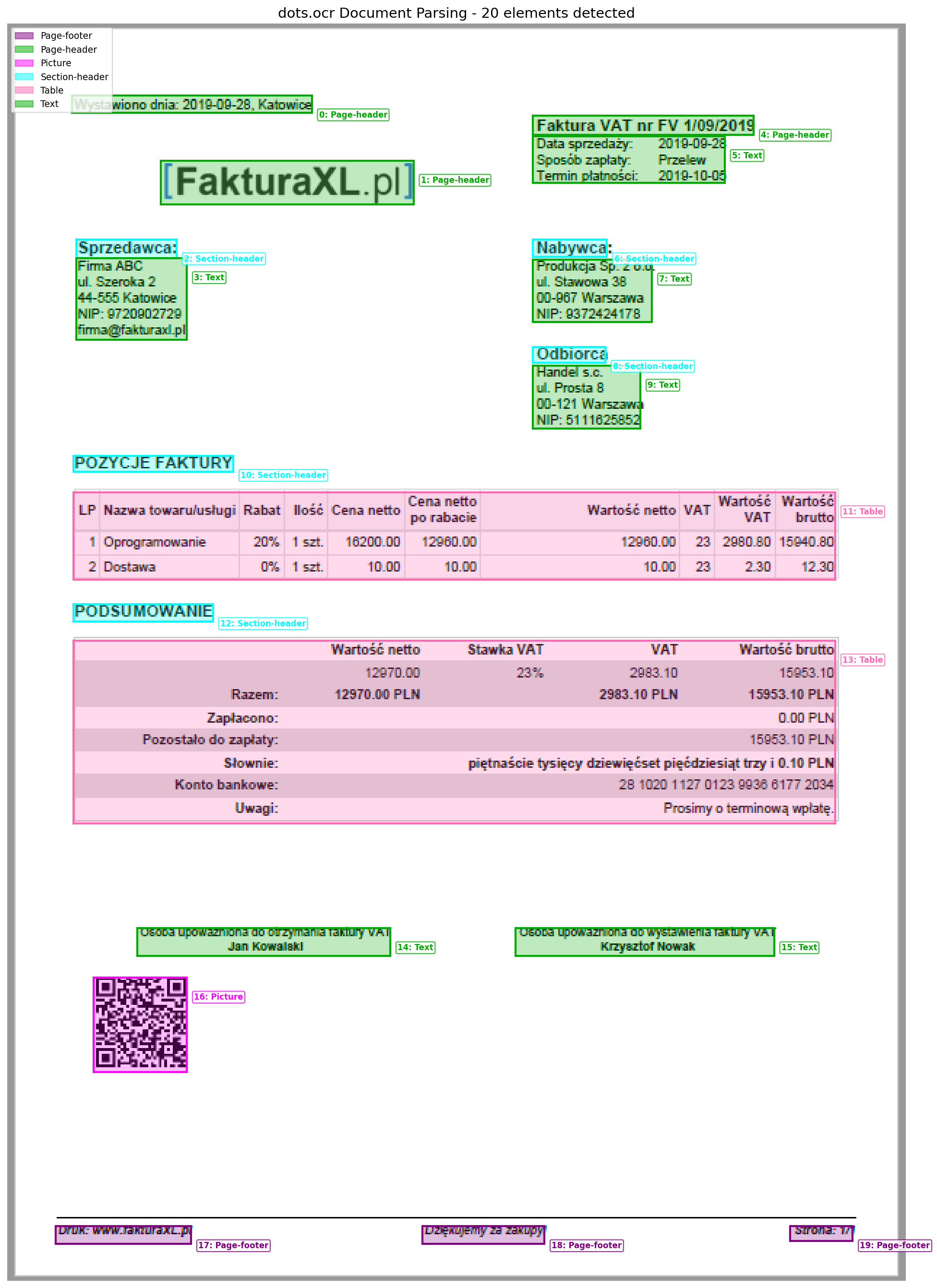
- Page-headers
- 3
- Section-headers
- 5
- Text blocks
- 6
- Tables (HTML)
- 2
- Pictures
- 1
- Page-footers
- 3
- Invoice Number
- FV 1/09/2019
- Net Total
- 12,970.00 PLN
- VAT (23%)
- 2,983.10 PLN
- Gross Total
- 15,953.10 PLN
- Bank Account
- 28 1020 1127...
Pick a path.
- High volume (>1,000/day) + GPU available
- Use dots.ocr self-hosted with vLLM. SOTA accuracy, ~$5/1000 pages (electricity). Requires 8GB+ VRAM.
- Low volume (<100/day) + No GPU
- Use dots.ocr via Replicate API. ~$0.02/page, no infrastructure. Same SOTA accuracy.
- Need structured JSON without code
- Use GPT-5.4. Worse table accuracy (72% vs 88.6%) but direct JSON output. ~$0.01/page.
- Enterprise compliance required
- Use Azure Document Intelligence or Google Document AI.$15/1000 pages. Pre-built invoice extractors with SLAs.
- Privacy required + No budget
- Use PaddleOCR locally. Free, runs on CPU. Less accurate tables but perfect for simple invoices.
Cost per 1,000 pages.
| Solution | Cost | Table Accuracy | Notes |
|---|---|---|---|
| dots.ocr (self-hosted) | $5 | 88.6% | Requires 8GB+ VRAM GPU |
| dots.ocr (Replicate) | $20 | 88.6% | No infrastructure needed |
| Azure / Google / AWS | $15 | ~80% | Enterprise features, SLAs |
| GPT-4o | $100 | 72.0% | Direct JSON, no parsing |
| Gemini 2.5 Pro | $35 | 85.8% | Good balance |
| PaddleOCR | $0 | ~65% | Free, local, no tables |
Strengths and limitations.
Advantages
- +88.6% table TEDS - Best-in-class for line items
- +Native bounding boxes - No separate detection model
- +100+ languages - Polish, German, Chinese in one model
- +Apache 2.0 - Open source, self-hostable
- +8GB VRAM - Runs on RTX 3070/4070
Limitations
- −Requires GPU for production speed
- −Formula/LaTeX recognition not best-in-class
- −May struggle with extremely dense documents
- −Tables output as HTML (need parsing)
Implementation.
dots.ocr via Replicate API
import replicate
import base64
import json
from PIL import Image
from io import BytesIO

PROMPT_LAYOUT_ALL = """Extract all layout elements with bounding boxes.
Output JSON array with: bbox, category, text.
Categories: Page-header, Section-header, Text, Table, Picture, Page-footer"""

def parse_invoice(image_path):
    img = Image.open(image_path).convert('RGB')
    buffer = BytesIO()
    img.save(buffer, format='JPEG')
    b64 = base64.b64encode(buffer.getvalue()).decode()

    output = replicate.run(
        "sljeff/dots.ocr:214a4fc4...",
        input={
            "image": f"data:image/jpeg;base64,{b64}",
            "prompt": PROMPT_LAYOUT_ALL,
            "temperature": 0.1,
        }
    )
    return json.loads("".join(output))

# Example output for Polish invoice:
# [
#   {"bbox": [361, 63, 513, 76], "category": "Page-header",
#    "text": "Faktura VAT nr FV 1/09/2019"},
#   {"bbox": [45, 322, 569, 382], "category": "Table",
#    "text": "<table><thead>...</thead><tbody>...</tbody></table>"}
# ]
Parse HTML Table Output
from bs4 import BeautifulSoup

def extract_line_items(cells):
    """Parse HTML table output from dots.ocr"""
    for cell in cells:
        if cell['category'] == 'Table':
            if 'Nazwa towaru' in cell['text'] or 'Description' in cell['text']:
                soup = BeautifulSoup(cell['text'], 'html.parser')
                rows = soup.find_all('tr')

                items = []
                for row in rows[1:]:  # Skip header
                    cols = row.find_all(['td', 'th'])
                    if len(cols) >= 5:
                        items.append({
                            'name': cols[1].text.strip(),
                            'quantity': cols[3].text.strip(),
                            'unit_price': cols[4].text.strip(),
                            'total': cols[-1].text.strip(),
                        })
                return items
    return []
GPT-5.4 Alternative (Direct JSON)
import base64
from openai import OpenAI

client = OpenAI()

def parse_invoice_gpt4o(image_path):
    with open(image_path, 'rb') as f:
        img_b64 = base64.b64encode(f.read()).decode()

    response = client.chat.completions.create(
        model="gpt-4o",
        messages=[{"role": "user", "content": [
            {"type": "text", "text": """Extract from this invoice:
- invoice_number, date, due_date
- seller (name, address, tax_id)
- buyer (name, address, tax_id)
- line_items (description, qty, unit_price, total)
- subtotal, tax_rate, tax_amount, total
Return as JSON."""},
            {"type": "image_url", "image_url": {"url": f"data:image/png;base64,{img_b64}"}}
        ]}]
    )
return json.loads(response.choices[0].message.content)Hardware requirements for self-hosting.
| Resource | Minimum | Recommended | Production |
|---|---|---|---|
| GPU VRAM | 8GB | 16GB | 24GB+ |
| System RAM | 8GB | 16GB | 32GB |
| Max Image Size | 11.3M pixels (e.g., 3360x3360) | ||
| Recommended DPI | 200 DPI | ||
vLLM Server Launch
vllm serve rednote-hilab/dots.ocr \
    --trust-remote-code \
    --async-scheduling \
    --gpu-memory-utilization 0.95
Warning: Never Use EasyOCR for Invoices
EasyOCR systematically confuses $ with 8. Every dollar amount will be wrong:
An invoice total of $9,743.30 becomes $89,743.30 - a 9x error that breaks accounting.
Which OCR fits your use case?
Answer 3 questions, get a personal recommendation. Or just drop your email — we reply.
Run the best OCR model on your Mac — $6
Hardparse runs PaddleOCR-VL-1.5 locally via Apple Metal. No cloud, no API keys, no subscription. Tables, formulas, handwriting, 109 languages.
Every purchase directly supports CodeSOTA's independent benchmark research.