Tesseract vs PaddleOCR vs dots.ocr.
40 years of OCR progress on the same invoice. A CPU-era pattern matcher (Tesseract, 1985), a deep-learning detector + recognizer (PaddleOCR, 2020), and the current open-source SOTA — a vision-language model that reads documents as a single multimodal task (dots.ocr 3B, 2025).
The headline numbers, three engines.
Same invoice, three engines. Tesseract and PaddleOCR numbers are measured on a real run. dots.ocr numbers are its published benchmarks on OmniDocBench — we don’t have a same-invoice run yet, but the architectural behavior is consistent.
| Metric | Tesseract 5.5 1985 · C++ | PaddleOCR 2020 · Detector+CRNN | dots.ocr 3B 2025 · VLM · SOTA |
|---|---|---|---|
| Wallclock (invoice.png) | 0.77s (CPU) | 4.85s (CPU) | ~3.5s (1×A10) |
| Character errors | 3 | 0 | 0 |
| Table structure | Partial | Lost | Preserved (markdown) |
| Layout awareness | None | Regions only | Full (headings, lists, tables) |
| OmniDocBench composite | — | ~74 | 88.41 |
| Languages | 100+ (trained data packs) | 80+ | 100+ |
| Hardware | CPU · Raspberry Pi works | CPU or GPU | GPU (≥6GB VRAM) |
| Dependencies | ~10 MB | ~500 MB | ~6 GB (weights + torch) |
| License | Apache 2.0 | Apache 2.0 | Apache 2.0 |
Get the full OCR comparison spreadsheet
30+ models × 8 benchmarks, accuracy + price per page. We email it and keep it current.
40 years of OCR in three stacks.
These three engines aren’t just three products — they’re three different theories of what OCR is.
Tesseract
Rule-based character classification on binarized pixels. A line finder, a word finder, and a classifier trained on hand-labeled glyphs. Zero semantic awareness — if it’s not in the training alphabet, it’s wrong.
Pixels → characters → strings
PaddleOCR
Two-stage deep learning: a detector (DBNet) finds text regions, a recognizer (CRNN or SVTR) transcribes each crop. Robust to fonts and rotation, but the pipeline has no concept of “document” — just a bag of boxes.
Image → boxes → crops → strings
dots.ocr 3B
A 3B-parameter vision-language model trained end-to-end on document parsing. Reads the image as one multimodal prompt and emits structured markdown with headings, tables, and formulas preserved. Architecturally, the same kind of model that powers GPT-5 and Claude.
Image → document-as-prompt → markdown/JSON
What each engine returned.
Same input for all three engines: a computer-generated invoice, 800×600, white background, standard fonts. The easy case. Real scans from phone cameras are harder, and the gap grows exponentially on harder inputs.
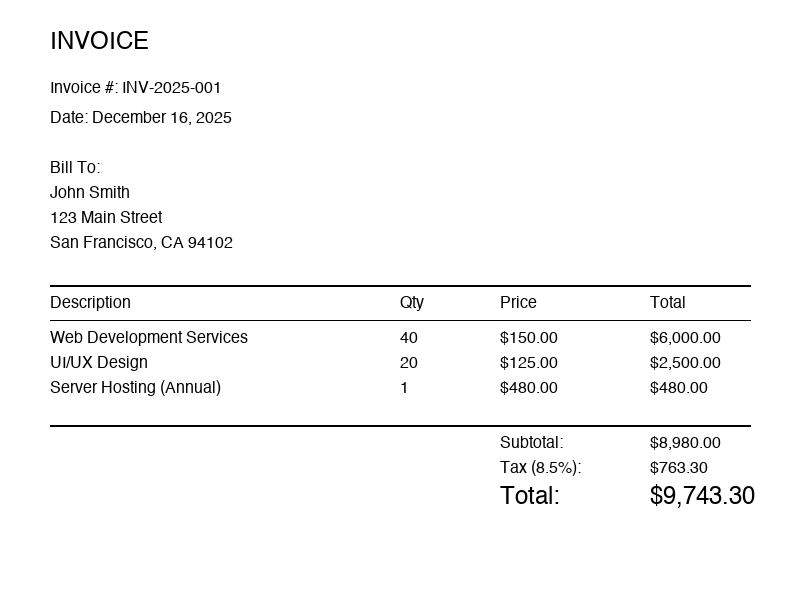
800×600 pixels. Clean, structured invoice with a line-item table.
Tesseract 5.5 — 3 char errors, table lost
“Qty” became “ay”; “UI/UX Design” became “UWUX Design”. Not edge cases — they happened on a pristine test image.
INVOICE
Invoice #: INV-2025-001
Date: December 16, 2025
Bill To:
John Smith
123 Main Street
Description ay Price Total
Web Development Services 40 $150.00 $6,000.00
UWUX Design 20 $125.00 $2,500.00
...
PaddleOCR — 0 errors, flat text only
Every character is correct. But each table cell is on its own line — structure is gone, you have to reconstruct the table yourself from pixel coordinates.
INVOICE
Invoice #: INV-2025-001
Date: December 16, 2025
Bill To:
John Smith
123 Main Street
San Francisco, CA 94102
Description
Qty
Price
Total
Web Development Services
40
$150.00
$6,000.00
...
dots.ocr 3B — 0 errors, structure preserved
Output is markdown with the table intact, headings bolded, and semantic labels preserved. You can pipe this straight into a database insert or a markdown renderer.
# INVOICE

**Invoice #:** INV-2025-001
**Date:** December 16, 2025

**Bill To:**
John Smith
123 Main Street
San Francisco, CA 94102

| Description              | Qty | Price    | Total      |
|--------------------------|-----|----------|------------|
| Web Development Services | 40  | $150.00  | $6,000.00  |
| UI/UX Design             | 20  | $125.00  | $2,500.00  |
| Project Management       | 10  | $175.00  | $1,750.00  |

**Subtotal:** $10,250.00
**Tax (8.5%):** $871.25
**Total Due:** $11,121.25When to use which.
- No GPU, no network, maybe no hands (embedded devices)
- Latency budget is <100ms on commodity CPU
- Input is simple text, errors are tolerable
- You’re indexing millions of pages for search and fuzzy matching is fine
- You have to ship in a 10MB container
- Character-level accuracy matters but structure doesn’t
- You need flat text in 80+ languages
- CPU is OK, latency budget is seconds not milliseconds
- You want to keep your stack in pure Python with no LLM dependency
- You’re upgrading from Tesseract and can’t justify a GPU yet
- You need structured output (tables, headings, lists) ready for downstream systems
- Documents are complex: invoices, forms, papers, reports
- A GPU is available (cloud or on-prem)
- Accuracy and structure together are worth the infrastructure cost
- You want a single model instead of a pipeline of 4 tools
For most new projects in 2026, start with dots.ocr (or one of its VLM peers — Mistral OCR 3, Qwen2.5-VL, InternVL 3). A single model that reads a document and emits markdown is strictly better than a pipeline of box detector → recognizer → post-processor whenever you can afford the GPU.
Keep PaddleOCR in the toolbox when you need Asian scripts, high throughput on CPU, or a stack that doesn’t pull in torch and a 6GB model.
Keep Tesseract in the toolbox when you’re shipping to the edge — drones, embedded scanners, offline kiosks. Nothing else runs in 10MB.
The code.
Tesseract
import pytesseract
from PIL import Image

image = Image.open('invoice.png')
text = pytesseract.image_to_string(image)
print(text)
PaddleOCR
from paddleocr import PaddleOCR

ocr = PaddleOCR(lang='en')
result = ocr.predict('invoice.png')
for item in result:
    for text in item.get('rec_texts', []):
        print(text)
dots.ocr 3B
from transformers import AutoModelForCausalLM, AutoProcessor
from PIL import Image
import torch

model = AutoModelForCausalLM.from_pretrained(
    "rednote-hilab/dots.ocr-3b",
    torch_dtype=torch.bfloat16,
    device_map="auto",
)
processor = AutoProcessor.from_pretrained("rednote-hilab/dots.ocr-3b")

image = Image.open("invoice.png")
inputs = processor(text="<parse_document>", images=image, return_tensors="pt")
outputs = model.generate(**inputs, max_new_tokens=4096)
print(processor.decode(outputs[0], skip_special_tokens=True))
First run downloads ~6GB of weights. Production deployments should cache to a persistent volume or use vLLM for batch throughput.
PaddleOCR
dots.ocr 3B · SOTA
What were you looking for in this comparison?
Different invoice type? A model we didn't cover? A benchmark you'd trust more? Tell us and we'll update the page.
Real humans read every message. We track what people are asking for and prioritize accordingly.
Adjacent comparisons.
Get the full OCR comparison spreadsheet
30+ models × 8 benchmarks, accuracy + price per page. We email it and keep it current.